Architecture
BYOC runs on AWS, Google Cloud, and Azure. This page covers the AWS reference architecture. For Google Cloud or Azure details, contact Composio sales.
AWS reference architecture
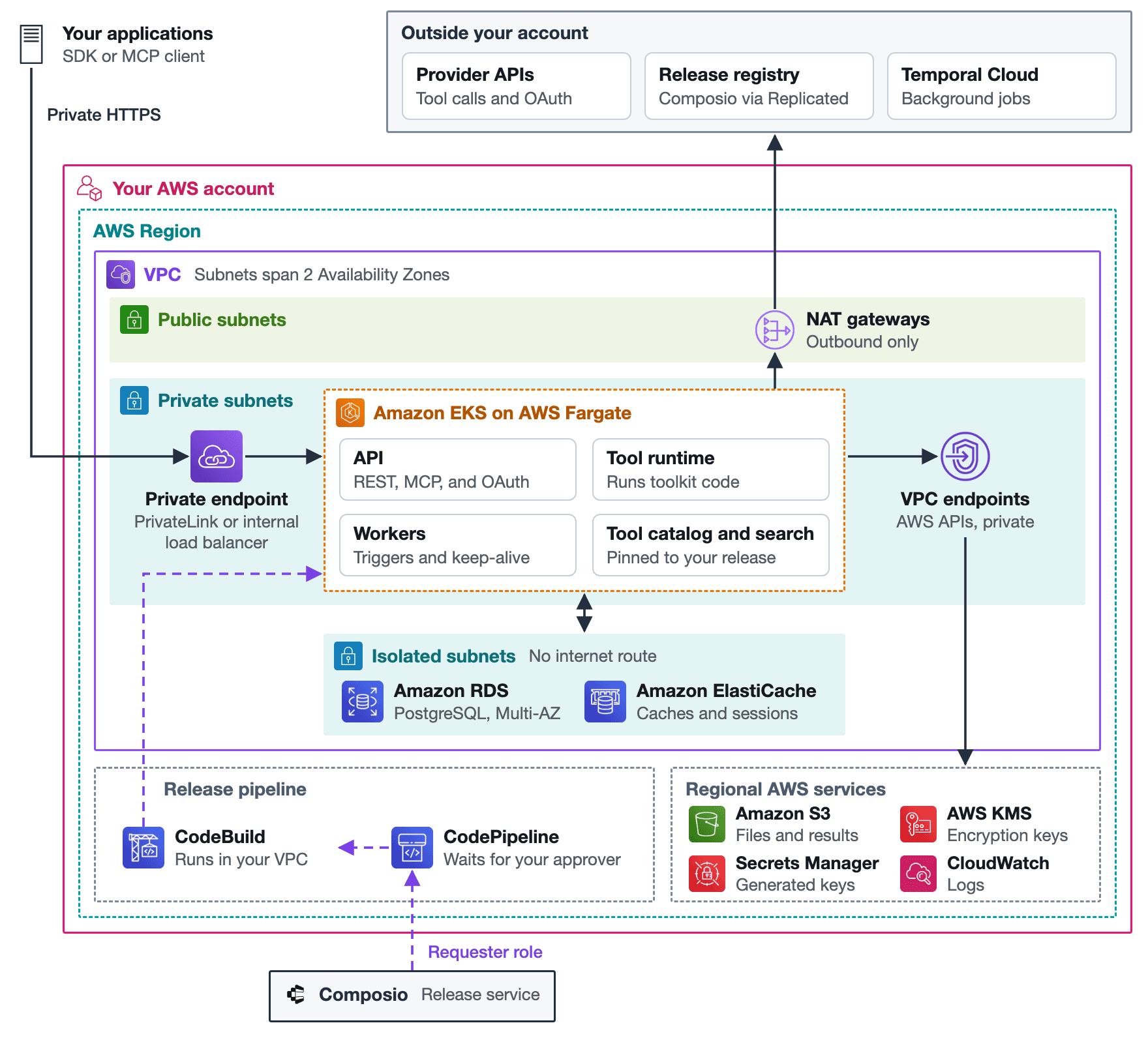
The AWS reference architecture runs Composio on Amazon EKS with AWS Fargate, in a dedicated AWS account. Security and access describes what Composio can do in that account.
| AWS service | Role in the deployment |
|---|---|
| Amazon EKS with AWS Fargate | Runs Composio's services in private subnets. EC2 nodes are an alternative to Fargate. |
| Amazon RDS for PostgreSQL | Stores projects, connected accounts, encrypted credentials, logs, and worker state. It runs across Availability Zones. |
| Amazon ElastiCache for Redis | Holds caches, sessions, and OAuth flow state. Redis never holds credentials in plaintext. |
| Amazon S3 | Stores files, large results, and release artifacts. |
| AWS KMS and AWS Secrets Manager | Encrypt the data stores and hold the deployment's generated keys. |
| Elastic Load Balancing and AWS PrivateLink | Give your applications private HTTPS access. |
| AWS CloudFormation, AWS CodePipeline, and AWS CodeBuild | Install the bootstrap, and run each approved release inside your VPC. |
| Amazon CloudWatch | Keeps deployment and support session logs. |
Network
- The bootstrap stack can create a VPC from a CIDR range you choose. The VPC spans 2 Availability Zones, with public and private subnets and 2 NAT gateways. You can also deploy into an existing VPC with 6 private subnets across 2 Availability Zones.
- Services run in private subnets. Databases and caches run in isolated subnets with no route to the internet.
- The EKS API endpoint is private, and the release pipeline reaches it from inside your VPC.
- The deployment creates no public ingress.
Private connectivity
Choose a connectivity mode before you install the bootstrap. The default, disabled, creates no endpoint for your applications.
| Mode | How your applications connect | What they can reach |
|---|---|---|
privatelink-api | AWS PrivateLink, on one private hostname | Every Composio API route, including sessions, MCP, and administration |
privatelink | AWS PrivateLink | Connected accounts, tool execution, and toolkit listings |
private-alb | An internal load balancer, for callers inside the deployment's VPC | Connected accounts, tool execution, and toolkit listings |
The privatelink and private-alb modes are restricted. Routes not listed in the table return 404. You can create, read, refresh, and check connected accounts, but Connect Link, sessions, MCP, and Proxy Execute aren't available. You also can't manage projects or auth configs through a restricted endpoint, so create them with Composio before your applications use the endpoint.
In the restricted modes, OAuth callbacks arrive through an edge relay. The edge relay is a public HTTPS proxy that you run, and it connects to a separate listener with mutual TLS.
PrivateLink carries the traffic but doesn't authenticate it, so every request still needs a Composio API key. If you use webhook Triggers, providers need a public route to your deployment. Agree that route with Composio during the architecture review.
Outbound traffic
Services reach AWS APIs through VPC endpoints. Everything else leaves through the NAT gateways. Provider APIs and Composio's release registry use HTTPS on port 443, and Temporal Cloud uses gRPC with TLS on port 7233. What leaves your account describes what each one receives.
Private subnets don't restrict outbound traffic on their own. To limit destinations by hostname, use your own egress controls, such as AWS Network Firewall.
What you prepare
- A dedicated AWS account in a commercial AWS region.
- A CIDR range for a new VPC that doesn't overlap your other networks, or an existing VPC with 6 private subnets across 2 Availability Zones.
- An existing IAM role for the person who approves releases and support sessions, and an email address for approval notifications.
- For PrivateLink, your hostnames, a certificate in AWS Certificate Manager, DNS records, and the AWS accounts allowed to connect.
- Optionally, your own KMS keys for each data store.
Your onboarding package contains the CloudFormation template, every IAM role with its exact permissions, and step-by-step install instructions.