Bring your own cloud (BYOC)
Composio BYOC runs Composio in a cloud account you own. Composio deploys and operates it, and your team approves every release. Tool calls run in your account, your account stores the credentials and logs, and requests to provider APIs leave from your network.
BYOC is available to Enterprise customers on AWS, Google Cloud, and Azure. This page uses AWS service names, from the AWS reference architecture. To plan a deployment, contact Composio.
How a tool call runs
Your backend points its Composio SDK or MCP client at your deployment's private endpoint. Composio's services in your account find the user's connected account, decrypt its credential in memory, and call the provider's API. The result returns to your application the same way.
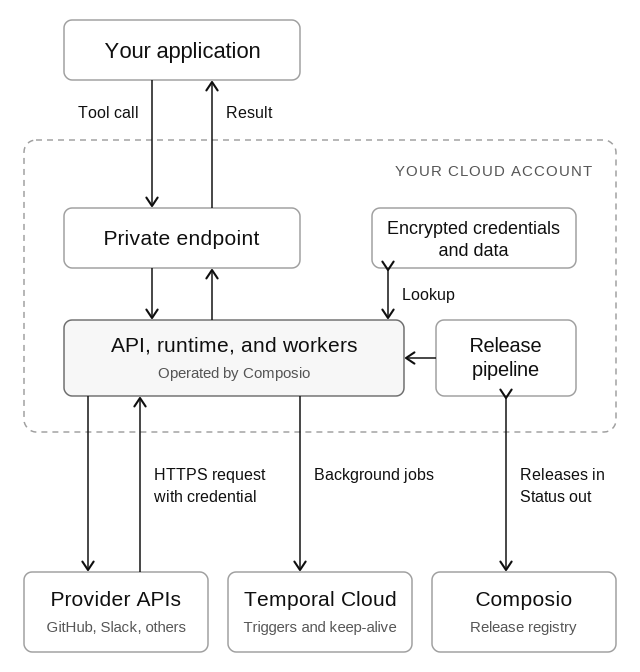
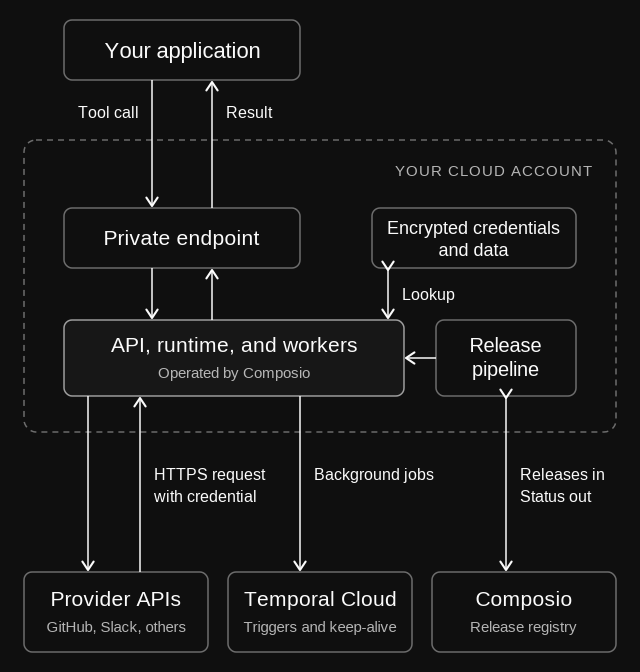
What runs in your account
| Component | What it does |
|---|---|
| API and authentication | Serves the Composio API and MCP, manages connected accounts, and runs OAuth flows. |
| Tool runtime | Runs toolkit code and calls provider APIs. |
| Workers | Run Triggers, credential keep-alive, and other background work. |
| Tool catalog and search | Holds the toolkits pinned to your release and finds the right tool for each task. Search uses an LLM and an embedding model, and both can run in your cloud. |
| Database and cache | Store projects, connected accounts, encrypted credentials, logs, and worker state. |
| Object storage | Stores files and large results. |
| Release pipeline | Builds a preview that shows what each release will change, and applies the release after your approval. Your team creates the pipeline once, by installing the bootstrap stack from your onboarding package. |
What's included
BYOC includes the Composio API and SDKs, connected accounts, tool execution, sessions, MCP, and files. It also includes semantic tool search and Triggers. Tool search uses an LLM and an embedding model that you choose, and Triggers use Temporal Cloud.
These parts of Composio Cloud work differently in BYOC:
- BYOC doesn't deploy the Composio dashboard. You manage projects, API keys, and auth configs through the API.
- Composio-managed OAuth apps aren't available. You use your own OAuth app for each provider.
- Enterprise MCP Gateway and SSO deploy separately.
- BYOC doesn't include Workbench or self-service custom toolkits. Composio can build custom connectors under your agreement, and shares their code with you before each deployment.
What leaves your account
BYOC isn't an air-gapped deployment. It makes these outbound connections:
| Destination | What it receives | When |
|---|---|---|
| Provider APIs | Tool calls and OAuth token requests, carrying the user's credential | Always |
| Composio release registry | Requests for release images, plus the installed version and component health | Always for images. You can turn off status reporting. |
| Temporal Cloud | Workflow inputs, results, and errors for background jobs. The inputs are mostly identifiers, schedules, and retry state. | When you use Triggers or scheduled credential keep-alive |
| Model providers | Tool search queries | Only if your search models run outside your account |
Composio distributes releases through Replicated, a software distribution service, so image pulls and status reports go to Replicated's registry. Workers in your cluster connect out to a Temporal Cloud namespace that Composio provides for your deployment, and Temporal never connects into your network. Trigger data and credentials stay in your database and object storage. Logs, metrics, and traces go to the monitoring system you choose.
Who does what
| Area | Composio | Your team |
|---|---|---|
| Cloud account | Uses only the roles you approve | Owns the account, its bill, and its organization policies |
| Infrastructure | Provisions and updates it through the release pipeline | Installs the bootstrap stack and approves each release |
| Network | Deploys into the network you provide, or creates one | Controls routing, egress rules, DNS, and certificates |
| Operations | Monitors health, responds to incidents, configures failover and backups, and tests restores | Sets availability and recovery requirements |
| Support | Requests a session when it needs access | Approves or declines each session |
| Provider apps | Helps you configure them | Creates OAuth apps and registers their redirect URIs |
How releases work
When a new version is ready, Composio requests a specific release. The pipeline in your account builds a preview of the changes and waits. Your approver reviews the preview and approves or declines it. After approval, the pipeline applies infrastructure changes, runs database migrations, rolls out the services, and checks their health. If you decline, the pipeline stops and the installed release keeps running.
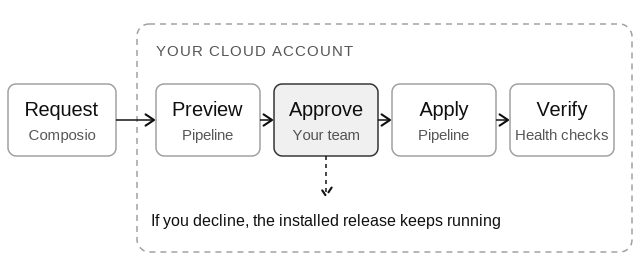
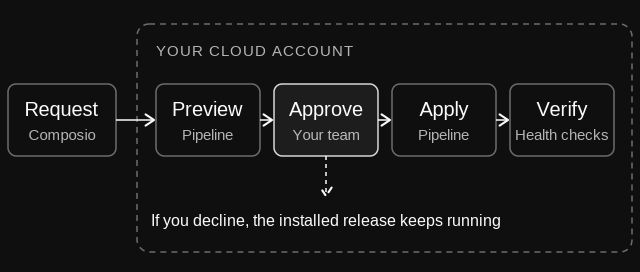
- The pipeline applies exactly the preview you approved, and rejects a release whose inputs changed after the preview.
- A release can't widen its own permissions or remove the approval step. Those changes require you to update the bootstrap stack.
- Each pipeline stage runs inside your VPC, under a role that your bootstrap stack creates.
- Each environment, such as staging or production, is a separate installation with its own pipeline.
Security and access
Composio holds no standing credentials
Composio has no long-lived credentials for your account. It assumes two roles that your bootstrap stack creates. Each role trusts only Composio's services and requires an external ID unique to your installation. Every session gets temporary credentials.
| Role | What it can do | What it can't do |
|---|---|---|
| Requester | Start the release pipeline and watch its progress, publish the release configuration, deliver the credential that pulls Composio's images, and read build logs and verification results | Approve a release, change the pipeline, start other builds, read your application secrets, assume other roles, or make IAM changes |
| Support request | Read your bootstrap stack's outputs, check the permissions of the deployment roles, and ask your approver for a support session | Approve a request, start a build, or connect to a session itself |
The requester role's policy explicitly denies each of those actions. If you remove the requester role, Composio can no longer request releases, and the installed release keeps running.
Support sessions
Support access is on by default, and every session needs your approval. You can turn it off when you install.
When an engineer needs access, they request a session for an incident. Your approver receives the request with the engineer's identity, the incident, the scope, and the duration. After approval, the session runs in a temporary container inside your VPC, with a Kubernetes token that expires. Composio engineers have no standing access to your cluster.
| Level | Default | What it allows |
|---|---|---|
| Diagnostics | Available, with approval for each session | Pod status, events, and logs in the Composio namespace. It can't read Kubernetes secrets or open a shell. |
| Operations | Off | Pod shells, port forwarding, and deleting individual pods so they restart. A shell can reach the credentials available to that pod. |
| Exact-pod escalation | Off | A shell in one pod that you name in advance. It can reach that pod's credentials. |
Diagnostics sessions can read application logs, which can include tool request and response data. CloudWatch records each session's approval, engineer, and incident, plus a terminal transcript for shell sessions. CloudTrail and the EKS audit log record the session's AWS and Kubernetes activity. Diagnostic exports leave your account only with your approval.
Keys and credentials
- On its first install, your deployment generates its own encryption keys and administrator token, and stores them in AWS Secrets Manager in your account. Composio doesn't supply these keys or keep a copy.
- Your PostgreSQL database stores provider credentials encrypted. The services that call providers decrypt a credential in memory when they make the call.
- The release pipeline reads the generated keys during an approved release, to configure the services.
- You can supply your own KMS keys for every data store, including the database, cache, object storage, logs, and secrets.
Three parties can reach plaintext credentials: the services that call providers, your cloud account's administrators, and a Composio engineer in a shell session that you turn on and approve. If your policy doesn't allow any Composio service to decrypt credentials, ask about customer-managed keys.
Data retention
Your team and Composio agree on retention for the database, backups, diagnostic exports, and Temporal workflow history. Data retention and handling describes the controls available in each project.
Your responsibilities
- Limit administrator access to your account, because account administrators can read the deployment's secrets.
- Limit your approver role to the people who approve releases and support sessions.
- Review the onboarding package before you install. It lists every role the deployment uses, with its trust policy and exact permissions.
- Authenticate your users and map them to Composio user IDs on your server. See token custody and credential isolation.
Build on BYOC
Applications call a BYOC deployment the same way they call Composio Cloud. The deployment has its own API hostname, projects, API keys, and OAuth apps.
Point your client at your deployment
Set the base URL to your deployment's API hostname. Both SDKs and the Composio CLI also read the COMPOSIO_BASE_URL environment variable.
from composio import Composio

composio = Composio(
    api_key="your-project-api-key",
    base_url="https://composio.internal.example.com",
)

toolkits = composio.toolkits.get()
Sessions, tools, and user IDs then work as they do in Composio Cloud. See Configure sessions. Your connectivity mode decides which API routes your applications can reach.
Create your first project and API key
Your deployment stores its administrator token in AWS Secrets Manager in your account. During onboarding, your Composio engineer works with your team to create the first organization, project, and API key with that token. After that, you manage projects, API keys, and auth configs through the API.
Use your own OAuth apps
For each provider, create an OAuth app and add it to your project as an auth config with your own OAuth credentials. Register this redirect URI with the provider:
https://<your-api-hostname>/api/v3/toolkits/auth/callbackYour users' browsers must be able to reach that hostname, for example over your VPN. If you use a restricted connectivity mode, register your edge relay's public hostname instead, with the same path. The edge relay is a public HTTPS proxy that you run. Restricted modes accept only OAuth2 callbacks sent with GET, so OAuth1 providers and providers that send callbacks with POST don't work.
The callback_url you pass when you connect an account only sets where users land after they connect. It doesn't change the redirect URI.
Allowlist your deployment's IP addresses
Some providers accept requests only from trusted IP addresses. In BYOC, requests to providers come from your deployment's NAT gateways or your own egress, not from Composio Cloud's addresses. Add your deployment's addresses to those providers' allowlists.
How onboarding works
Architecture review. Your team and Composio agree on the cloud, region, network, private connectivity, providers, and recovery requirements.
Prepare your account. You set up a dedicated cloud account and the network, certificates, and approver identity the deployment needs. Architecture lists them for AWS.
Install the bootstrap. Your team reviews the onboarding package, runs its checks, and installs the bootstrap stack. The stack creates the release pipeline and its roles.
Approve the first release. Composio registers your deployment and requests the first release. Your approver reviews the preview, and the pipeline deploys and verifies the services.
Create your first project. Your team and Composio create the first project and API key, and you connect your applications. See Build on BYOC.