Toolkit Versioning
If you're building an agent, we recommend using sessions instead. Sessions handle toolkit versions automatically so you don't have to manage them yourself.
Toolkit versioning ensures your tools behave consistently across deployments. You can pin specific versions in production, test new releases in development, and roll back when needed.
Per-execution override
Pass version directly to composio.tools.execute() to pin one call. The per-call value takes precedence over SDK initialization and environment variables, and leaves the defaults for other calls unchanged.
These examples use 20251027_00. Replace it with an available version you have tested for your toolkit.
from composio import Composio

composio = Composio(api_key="YOUR_API_KEY")

result = composio.tools.execute(
    "GITHUB_LIST_STARGAZERS",
    arguments={
        "owner": "ComposioHQ",
        "repo": "composio"
    },
    user_id="user-k7334",
    version="20251027_00",
)
print(result)
A dated version passes the direct-execution version check without a bypass flag. See Direct Tool Execution for more examples.
Find available versions
To view available versions, go to Dashboard > All Toolkits > select a toolkit. The version dropdown shows the latest and all available versions:
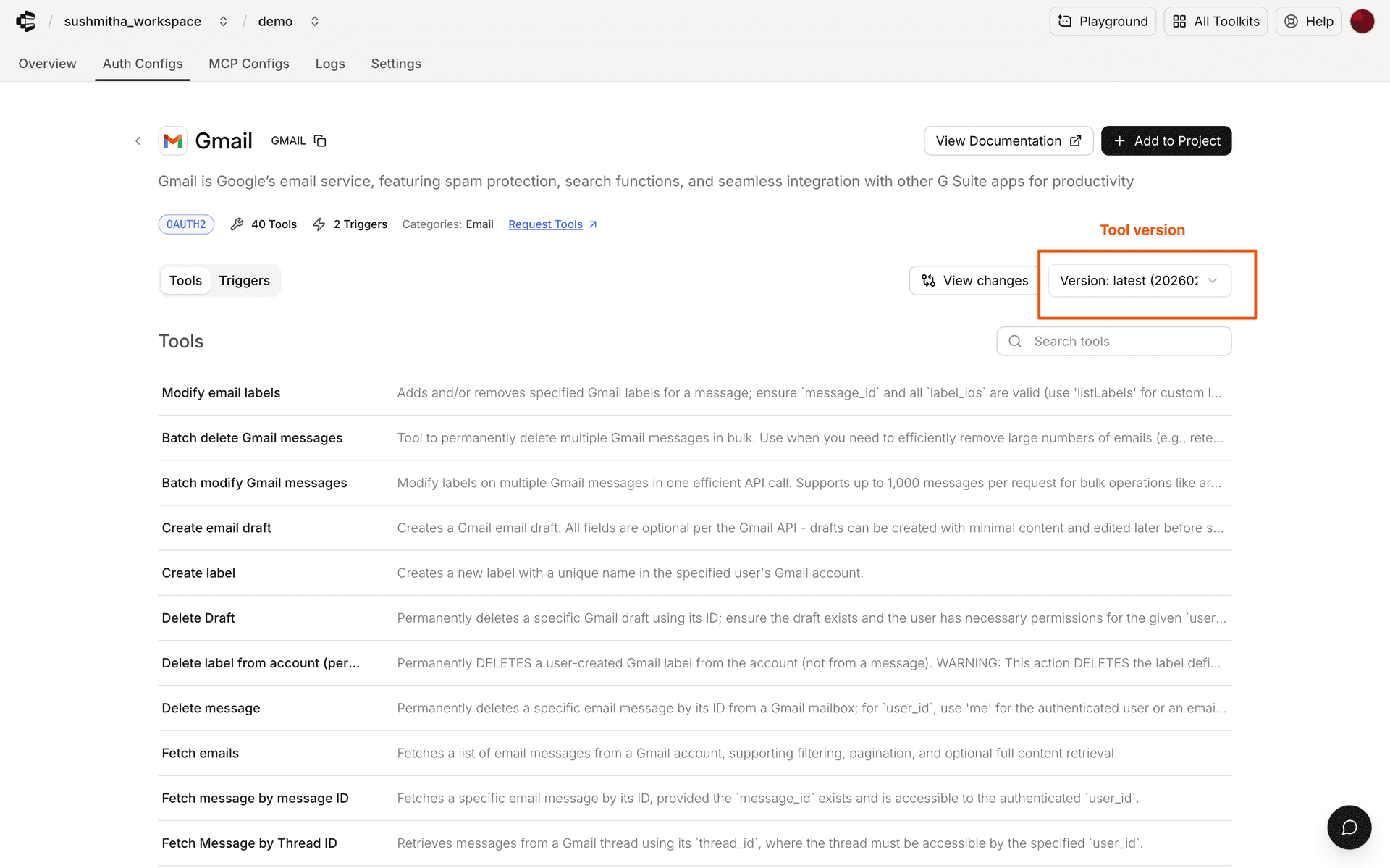
You can also find the latest version for each toolkit on the Toolkits page in the docs. Select a toolkit to see its current version and available tools.
Starting from Python SDK v0.9.0 and TypeScript SDK v0.2.0, specifying versions is required for manual tool execution — and "latest" is not accepted there on its own. To run the newest version with tools.execute(), pass dangerously_skip_version_check=True (TypeScript: dangerouslySkipVersionCheck: true) on the call; otherwise pin a dated version. "latest" works without the flag everywhere else (fetching tools, sessions).
Default version behavior
The v3 API defaults to the base version (00000000_00) when you don't specify a version. This can return fewer tools than the platform UI. Pass toolkit_versions=latest or a specific version to select a newer version. The v3.1 tools API defaults to the latest version.
For example, a v3 tools-list request without toolkit_versions returns the base version:
# Without toolkit_versions: returns tools from the base version
curl 'https://backend.composio.dev/api/v3/tools?toolkit_slug=googledrive' \
  -H 'x-api-key: YOUR_API_KEY'

# With toolkit_versions=latest: returns tools from the latest version
curl 'https://backend.composio.dev/api/v3/tools?toolkit_slug=googledrive&toolkit_versions=latest' \
  -H 'x-api-key: YOUR_API_KEY'
Configuration methods
To use the same version across calls, set a default at SDK initialization or through environment variables. A per-execution override takes precedence over either default.
SDK initialization
from composio import Composio

# Pin specific versions for each toolkit
composio = Composio(
    api_key="YOUR_API_KEY",
    toolkit_versions={
        "github": "20251027_00",
        "slack": "20251027_00",
        "gmail": "20251027_00"
    }
)
Environment variables
# Set versions for specific toolkits
export COMPOSIO_TOOLKIT_VERSION_GITHUB="20251027_00"
export COMPOSIO_TOOLKIT_VERSION_SLACK="20251027_00"
export COMPOSIO_TOOLKIT_VERSION_GMAIL="20251027_00"
Version format
Versions follow the format YYYYMMDD_NN:
YYYYMMDD: Release dateNN: Sequential release number
# Pin to a specific version
toolkit_versions = {"github": "20251027_00"}

# Always use the newest tools (manual execution additionally requires
# dangerously_skip_version_check=True on the execute call)
toolkit_versions = {"github": "latest"}
Choosing between latest and a pinned version
The right choice depends on how your application consumes tool outputs:
-
Use
latestwhen tool outputs are consumed by an LLM or AI agent. Agents interpret responses dynamically and adapt to changes in output structure. Usinglatestensures your agent always has access to the newest tools and improvements without manual intervention. For manual execution (tools.execute()),latestrequires the explicit opt-indangerously_skip_version_check=True/dangerouslySkipVersionCheck: trueon the call — the flag's name is the reminder that output schemas can change between releases. -
Pin a specific version when tool outputs are consumed programmatically — for example, if your code destructures specific fields from a response, maps outputs to a database schema, or feeds results into a typed pipeline. Schema changes in a new version could silently break these integrations.
As a rule of thumb: if an LLM reads the output, use latest. If your code parses the output, pin the version.
Most agentic applications — including all session-based workflows — use latest by default and benefit from always having the most up-to-date tools. If you're building structured data pipelines or integrations with fixed response parsing, pin to a tested version and upgrade on your own schedule.
Version resolution order
- Per-execution version (highest priority)
- SDK initialization version
- Environment variable (toolkit-specific)
Managing versions
Check available versions using:
# Get toolkit information including available versions
toolkit = composio.toolkits.get(slug="github")

# Extract and print version information
print(f"Toolkit: {toolkit.name}")
print(f"Current Version: {toolkit.meta.version}")
print(f"Available Versions: {toolkit.meta.available_versions}")
Retrieve toolkit changelogs
Call composio.toolkits.changelog() in Python or await composio.toolkits.changelog() in TypeScript to retrieve the last 10 versions for each toolkit. The response's items contain each toolkit's slug and version entries, which you can review before changing a pinned version.
Deprecation and sunset
Composio-managed toolkit versions are deprecated 12 months after they're published and retired 3 months after that. The newest version of a toolkit is never deprecated, so pinning a current version and upgrading on your own schedule keeps you clear of both dates.
When a request resolves to a deprecated version, the API adds a Composio-Deprecated-Toolkits response header alongside the normal response:
Composio-Deprecated-Toolkits: "GMAIL";version="20250114_00";deprecated=@1779840000;sunset=@1787788800;reason="lifecycle"The header is an RFC 9651 structured-field list. Each item names the toolkit slug and the resolved version, plus optional deprecated and sunset dates (Unix seconds, prefixed with @) and a reason. Versions deprecated by hand carry only version.
Single-toolkit routes carry the header: toolkit get, tool get, tool execute, text-to-request, trigger type get, trigger upsert and setup, and trigger authorization entities. Listing endpoints never do.
SDK warning
Both SDKs read the header and warn once per process for each deprecated toolkit version. The call still succeeds.
[Deprecation] Toolkit GMAIL version 20250114_00 was deprecated on 2026-05-27 (lifecycle) and will stop working on 2026-08-27. Pin a newer version with toolkit_versions={"gmail": "<version>"} or COMPOSIO_TOOLKIT_VERSION_GMAIL. See https://docs.composio.dev/docs/tools-direct/toolkit-versioning#deprecation-and-sunset.The warning is a ComposioDeprecationWarning (a UserWarning subclass), so standard warning filters apply:
import warnings
from composio import ComposioDeprecationWarning

warnings.filterwarnings("ignore", category=ComposioDeprecationWarning)
When the header omits reason or sunset, the warning omits those clauses too.
Moving off a deprecated version
Pick a newer version from the dashboard or toolkits.get(), then pin it the same way you pin any version: at SDK initialization, through an environment variable, or per execute call. The warning stops as soon as requests resolve to a version that isn't deprecated.
After the sunset date, requests for the retired version fail with HTTP 410 Gone until you pin a supported version.
Next
Fetching tools
Fetch and filter tools, inspect schemas, and search semantically