Instant
Composio Instant gives your agent capabilities beyond what your users have connected, including web search, scraping, data enrichment, and image and video generation. We add more regularly. Supported tools run on Composio's provider accounts, so your users don't need OAuth, provider API keys, or per-provider signups. Calls through those accounts charge your Composio balance. When a task needs a user's own identity, they can still connect their account.
Experimental access
Email support@composio.dev to enable Instant for your project during experimental access. A Session cannot override a project where Instant is off.
Once the project setting is enabled, new Sessions can use eligible instant tools by default, even if instant is omitted. Set instant=False in Python or instant: false in TypeScript when creating a Session that must not incur Instant usage charges.
Balance and failed calls
Developer organizations get a one-time $2 starter credit. Check your balance in Dashboard → Organization Settings → Billing. On Pro, add prepaid funds there; Hobby organizations must upgrade to Pro before adding funds. When Composio confirms that the balance is exhausted, an Instant call fails with HTTP 402 (Metering_WalletBalanceExhausted). It does not fall back to another account. Calls that select a user's connected account can still run. Balance verification is asynchronous, so $0 is not a strict per-call spending cap.
Find eligible tools
Instant coverage is per tool, not per toolkit. A toolkit may support instant tools without every tool in it being eligible. Composio's provider account can be shared across customers, so only reviewed actions can run through it. Actions that could reveal shared account history or send arbitrary proxy requests are excluded. Use a connected account for actions Instant does not support.
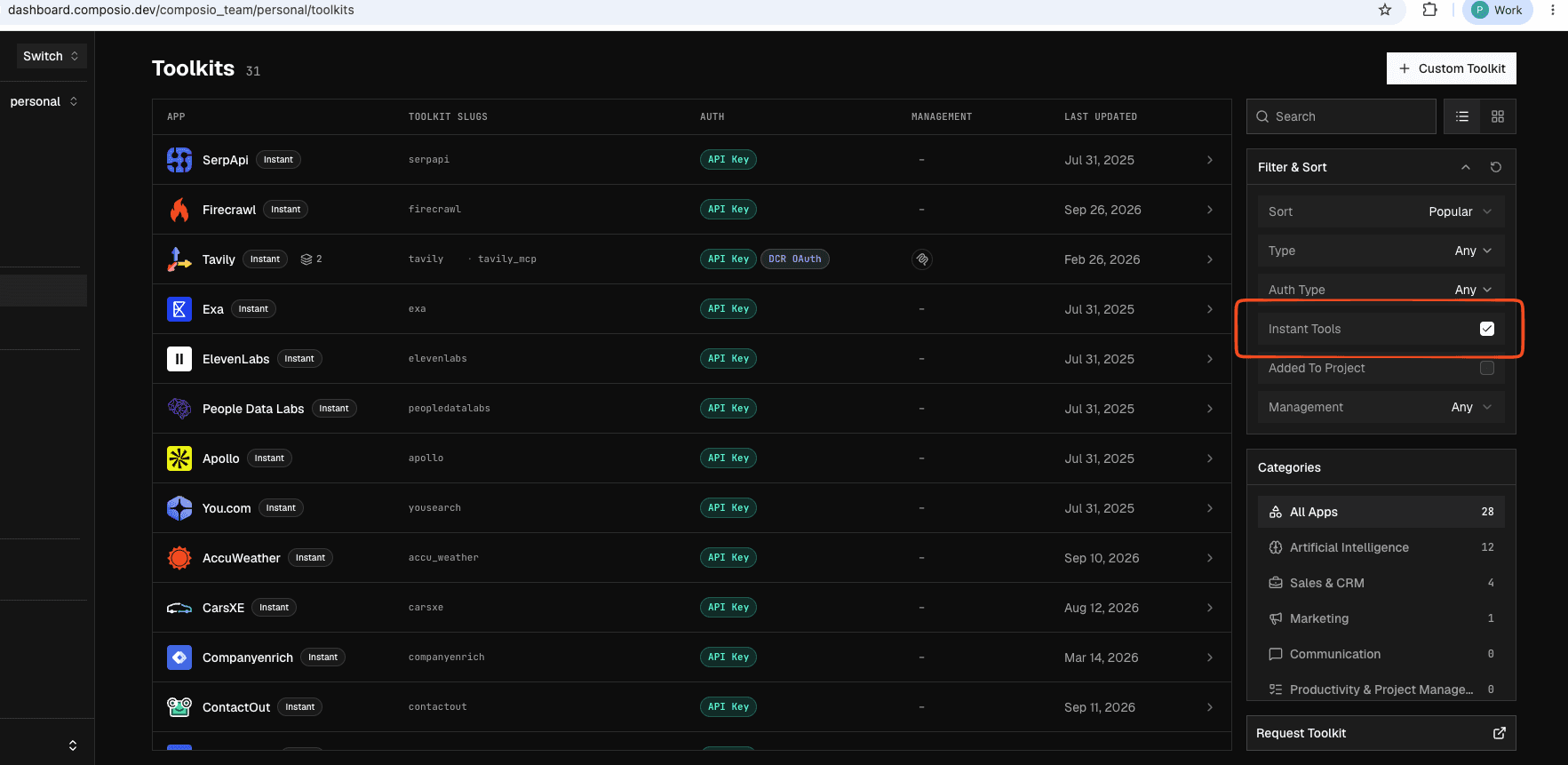
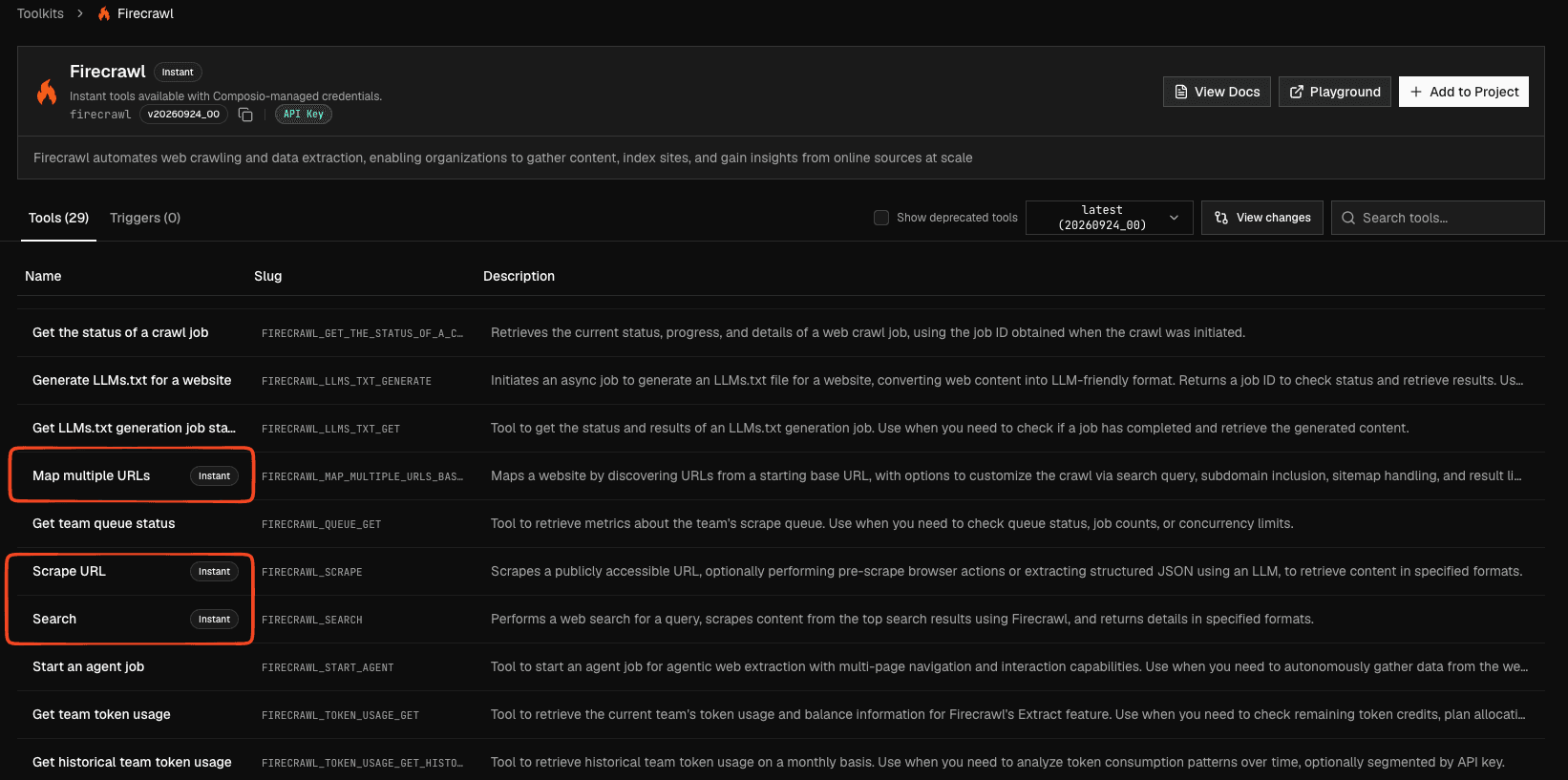
In the dashboard, open Toolkits and select the filter for instant tools. An Instant badge on a toolkit means at least one of its tools supports Instant access. Open the toolkit to find the Instant badge beside each eligible tool.
Instant eligibility and pricing discovery in the catalog APIs are coming soon. The public toolkit listing API does not yet return Instant availability or offer an Instant filter. Do not infer Instant support from no_auth or composio_managed_auth_schemes; they describe different access routes. During experimental access, ask support@composio.dev to confirm supported tools and rates.
Create a Session
After your project is enabled, create a Session. This example makes Exa available and permits Instant usage for its eligible tools:
from composio import Composio

composio = Composio()
session = composio.sessions.create(
    user_id="user_123",
    toolkits=["exa"],
    instant={
        "toolkits": {"enable": ["exa"]},
        "return_instant_charge": True,
    },
)
Top-level toolkits controls which tools the Session can discover and run. Omit it to make all toolkits discoverable. instant.toolkits separately restricts which eligible tools can incur Instant usage charges. Omitting instant.toolkits does not restrict Instant usage: eligible tools remain available when the project and Session permit them. return_instant_charge defaults to false and only controls whether the actual charge appears in the immediate tool response. A toolkit with Instant support can still contain tools that need a connected account; Instant account coverage is tool-specific.
Run a search with an agent
Install composio, openai-agents, and python-dotenv for Python, or @composio/core, @openai/agents, zod, and dotenv for TypeScript. Put COMPOSIO_API_KEY and OPENAI_API_KEY in a .env file as in the Quickstart. This small agent can choose when to search. The wrapper prints the Instant charge after each search call:
from agents import Agent, Runner, function_tool
from composio import Composio
from dotenv import load_dotenv

load_dotenv()
session = Composio().sessions.create(user_id="user_123", toolkits=["exa"], instant={"return_instant_charge": True})

@function_tool
def search(query: str) -> str:
    result = session.execute("EXA_SEARCH", arguments={"query": query})
    print("Instant charge:", result.instant_charge or "none")
    return str(result.data)

agent = Agent(name="Researcher", instructions="Use search when you need current information.", tools=[search])
while prompt := input("You: "):
    print(Runner.run_sync(agent, prompt).final_output)
The charge is present only if an Instant account served the call. A connected-account call prints none. Check the tool input schema if you change tools or arguments.
Find and run other tools
Pass session.tools() to your agent as in the Quickstart, so it can discover and run eligible tools. If your agent uses MCP, expose the same Session through session.mcp as described in Using sessions via MCP. The Instant usage policy applies to that Session in either path; your agent does not need a separate Instant usage setting.
tools = session.tools() # Pass these to your agent framework.To run a known tool yourself, use the Session's execute method:
result = session.execute("EXA_SEARCH", arguments={"query": "Composio documentation"})Check the current tool input schema before constructing arguments. A tool appearing in a toolkit does not mean Instant account access is available for that tool. Confirm supported tools and rates during Experimental access.
Read charge details
With instant.return_instant_charge enabled (instant.returnInstantCharge in TypeScript), the response from session.execute() includes instant_charge (instantCharge in TypeScript) when an Instant account runs the tool. Read it from the result above:
charge = result.instant_charge
if charge is not None:
    print(charge["amount"], charge["currency"], charge["charged_by"])
The InstantCharge type is exported from composio.types and includes amount, currency, and charged_by. Python provider integrations and mixed local/remote multi-tool execution also preserve these charge details.
Control Instant usage
instant is a Session policy in both SDKs. It does not enable a toolkit that top-level toolkits excludes, and it does not change a connected account you explicitly selected.
The toolkit filter and per-tool filter intersect. A tools.exa rule alone does not disable Instant usage for other eligible toolkits. Use instant.toolkits when you need a toolkit allowlist. Each filter accepts either enable or disable, not both.
The examples below use Python and REST field names. In TypeScript, use instant and returnInstantCharge, and read the charge from instantCharge on the tool result.
| Session value | Effect |
|---|---|
Omitted or {} | Permits Instant usage for eligible tools, subject to the project setting and normal Session filters. The charge is not returned in tool responses by default. |
false | Disables Instant usage for that Session. Your own connected-account routes remain available. |
{ "toolkits": { "enable": ["exa"] } } | Permits Instant usage only for listed toolkits. Use disable instead to exclude selected toolkits. |
{ "tools": { "exa": { "enable": ["EXA_SEARCH"] } } } | Narrows Instant usage to selected tools within a toolkit. |
{ "return_instant_charge": true } | Requests the actual instant_charge in an eligible Session tool response. On create, this changes charge visibility, not permission to spend. On update, it also re-enables Instant usage on a Session set to false, like any other object. |
For example, keep Exa and Firecrawl available, but permit Instant usage only for EXA_SEARCH:
session = composio.sessions.create(
    user_id="user_123",
    toolkits=["exa", "firecrawl"],
    instant={
        "toolkits": {"enable": ["exa"]},
        "tools": {"exa": {"enable": ["EXA_SEARCH"]}},
    },
)
To keep both toolkits discoverable but exclude Firecrawl and EXA_SEARCH from Instant usage, use disable:
session = composio.sessions.create(
    user_id="user_123",
    toolkits=["exa", "firecrawl"],
    instant={
        "toolkits": {"disable": ["firecrawl"]},
        "tools": {"exa": {"disable": ["EXA_SEARCH"]}},
    },
)
To stop Instant usage on an existing Session, update its policy:
session.update(instant=False)Updating a disabled Session
On patch, omitted instant fields keep their existing values. But supplying any instant object after instant=false, even { "return_instant_charge": true }, silently re-enables Instant spending for that Session if the project allows it. Leave instant as false if the Session must not spend.
Know which account runs the tool
An Instant account is a provider account held by Composio for specific tools. It is different from Composio-managed auth, where Composio supplies OAuth application credentials but your user still connects their own account. Composio-managed auth alone does not make a tool available through Composio Instant.
You pay an Instant charge only when Composio's Instant account runs the tool. A call using the user's own connection has no Composio Instant charge; the provider may bill that user under their own plan. If you select a connected account explicitly, that route wins and does not fall back to the Instant account on failure. Otherwise, available user or shared connections take priority over an Instant account. If the chosen tool is not supported by an Instant account, it follows the normal connection flow.
Session search tells you when an Instant account serves a toolkit. The toolkit's connection status includes instant_account.allowed_tool_slugs (instantAccount.allowedToolSlugs in TypeScript), which lists the tools that run on it. Any other tool in that toolkit needs the user's own connection.
To choose the Instant account explicitly, pass account="instant_account" to Python session.execute() or { account: "instant_account" } as TypeScript execution options. For direct composio.tools.execute(), pass connected_account_id="instant_account" in Python or connectedAccountId: "instant_account" in TypeScript. This route does not fall back to another credential if it fails.
Instant accounts cannot run arbitrary provider requests through proxy execution. Use supported tool actions. Direct execution outside a Session does not inherit its instant policy.
Review usage
Use the project usage summary API for totals and the tool-execution logs API for individual calls. The summary's instant_charge is a top-level field; individual log charges appear in metadata.instant_charge. Both are exact USD strings. Filter logs by session_id when you need to trace a Session. These records remain available even when return_instant_charge is false.
See Configuring Sessions for general toolkit and tool filters and the create Session API reference for the complete request schema.